


Showing posts with label Andriod player. Show all posts
လူႀကိဳ က္မ်ားတဲ့ MX Player Pro v1.7.38
MX Player Pro v1.7.38 Apk ဗားရွင္းအသစ္ေလးပါ MX Player Pro ကိုမွ ႀကိဳက္တဲ့ေဘာ္ဒါ ေတြအတြက္တင္ေပးလိုက္ပါတယ္ေအာက္မွာေဒါင္းပါ၊၊၊ Android OS Version2.1 ႏွင့္အထက္႐ွိထား ေသာဖုန္းမ်ားမွာ အသံုးျပဳႏိုင္ပါၿပီ။ဒါေပမဲ့ Play Store မွာထိုင္းဘတ္ 200.00နဲ႕ေရာင္းပါတယ္။ဒီမွာေတာ့အခမဲ့ေဒါင္းယူသြားႏိုင္ပါတယ္ဗ်ာ။

THIS IS THE AD-FREE VERSION OF MX PLAYER.
MX Player - The best way to enjoy your movies.
a) HARDWARE ACCELERATION - Hardware acceleration can be applied to more videos with the help of new H/W decoder.
b) MULTI-CORE DECODING - MX Player is the first Android video player which supports multi-core decoding. Test result proved that dual-core device’s performance is up to 70% better than single-core devices.
c) PINCH TO ZOOM, ZOOM AND PAN - Easily zoom in and out by pinching and swiping across the screen. Zoom and Pan is also available by option.
d) SUBTITLE GESTURES - Scroll forward/backward to move to next/previous text, Up/down to move text up and down, Zoom in/out to change text size.
e) KIDS LOCK - Keep your kids entertained without having to worry that they can make calls or touch other apps. (plugin required)
Subtitle formats:
- DVD, DVB, SSA/ASS Subtitle tracks.
- SubStation Alpha(.ssa/.ass) with full styling.
- SAMI(.smi) with ruby tag support.
- SubRip(.srt)
- MicroDVD(.sub/.txt)
- SubViewer2.0(.sub)
- MPL2(.mpl/.txt)
- PowerDivX(.psb/.txt)
- TMPlayer(.txt)
******
If you can't buy from Google Play, please check our home page. We support more payment methods. (https://sites.google.com/site/mxvpen/buy)
******
About "System Tools - display system-level alerts" permission: This is useful to block any accidental key entries while you are watching videos. This input block function will make sure that you can watch videos without interruption.
******
If you are facing "package file is invalid" error, please install it again from product home page (https://sites.google.com/site/mxvpen/download)
******
If you have any questions, please visit XDA MX Player forum.
http://forum.xda-developers.com/apps/mx-player
Some of the screens are from the Elephants Dreams licensed under the Creative Commons Attribution 2.5.
(c) copyright 2006, Blender Foundation / Netherlands Media Art Institute / www.elephantsdream.org
Some of the screens are from the Big Buck Bunny licensed under the Creative Commons Attribution 3.0 Unported.
(c) copyright 2008, Blender Foundation / www.bigbuckbunny.org


Shuttle+ Music Player v1.5.0-beta9

Shuttle+ Music Playerေလးတင္ေပး လိုက္ပါတယ္။Shuttle+ Music Player v1.5.0-beta9 ေလးဗားရွင္း အသစ္ထြက္လာလို႔ အသံုးလိုေနသူေတြအတြက္ ေဆာ့၀ဲေကာင္းေလးတင္ေပးလိုက္ပါတယ္၊၊ Android OS Version2.3 ႏွင့္အထက္႐ွိထား ေသာဖုန္းမ်ားမွာ အသံုးျပဳႏိုင္ပါၿပီ။ဒါေပမဲ့ Play Store မွာထိုင္းဘတ္ 55.00နဲ႕ေရာင္းပါတယ္။ဒီမွာေတာ့အခမဲ့ေဒါင္းယူသြားႏိုင္ပါတယ္ဗ်ာ။
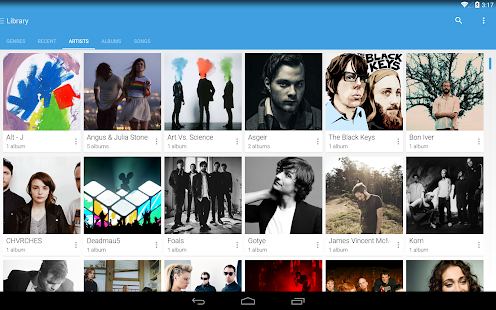
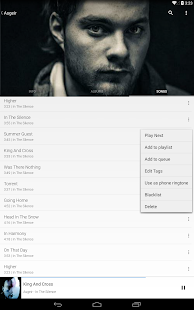

Shuttle+ Music Player is a simple, lightweight and powerful music player for Android. Featuring a built-in equalizer, lyrics, folder browsing, sleep timer, gapless playback, artwork downloading and a clean, fresh Google Now style interface, Shuttle is the music player of choice for your Android device.
Shuttle+ includes folder browsing, tag editing, Chromecast support and additional themes not available in the free version.
**Note: Due to changes in Kitkat, tag editing is no longer possible for files stored on the SD card on Android 4.4+**
Follow me on Google+ to keep up to date with the latest changes, and for beta testing opportunities.
https://plus.google.com/+TimothyMalseed/
Features include:
- Folder browsing
- Folder whitelist
- Playlists, batch add, swipe to remove, drag 'n drop
- Blacklist individual songs
- Enqueue songs to play next
- Sleep timer
- Chromecast support
- Lockscreen controls (ICS+)
- Notification controls (Honeycomb+)
- Jelly Bean notification controls
- Kitkat lockscreen controls
- Gapless playback (Jelly Bean+)
- Optimised layout for phones and tablets
- Highly customizable widgets
- Headset button controls
- Album & artist artwork downloading
- Optional 'Google Now' style cards UI
- Gesture support (swipe to change track, swipe to remove from playlist, drag n drop playlist items etc.)
- Loads of holo style dark and light themes
- Tag editing (no longer available for files stored on the SD card on Android 4.4 (Kitkat)
- Scrobbling via Simple Last.FM Scrobbler
- Lyrics search via MusiXmatch & embedded lyrics
- Voice search & Google Now voice command support
- 6 band equalizer with bass boost & DSP manager support
- Fresh, modern & relevant Holo style cards UI throughout the app
Upcoming features:
- Car mode
- Compilation album sorting (sort by album-artist)
Join the beta testing community here:
https://plus.google.com/communities/117933878882076364363
Like Shuttle+ on Facebook:
http://www.facebook.com/SimpleCity.AMP
Shuttle+ Music Playerေလးတင္ေပး လိုက္ပါတယ္။3D fix ပါ။ Apk File Size 6.2MB ႐ွိၿပီး၊ Android OS Version2.3 ႏွင့္အထက္႐ွိထား ေသာဖုန္းမ်ားမွာ အသံုးျပဳႏိုင္ပါၿပီ။ဒါေပမဲ့ Play Store မွာထိုင္းဘတ္ 32.00နဲ႕ေရာင္းပါတယ္။ဒီမွာေတာ့အခမဲ့ေဒါင္းယူသြားႏိုင္ပါတယ္ဗ်ာ။
Copy and WIN : http://bit.ly/copynwin
Copy and WIN : http://bit.ly/copynwin
♫Archos Video Player v8.0.1♫

Movie ေတြၾကည္လင္ျပတ္သားစြာၾကည္႔ရႈႏိုင္တဲ့ Archos Video Player ဗားရွင္းအသစ္ေလးထြက္လာ လို႔ Movie ေတြကိုရုပ္ထြက္ေကာင္းေကာင္း နဲ႔ၾကည့္ျခင္တဲ့ေဘာ္ဒါေတြအတြက္တင္ေပးလိုက္ပါတယ္၊၊video formatေတာ္ေတာ္မ်ားမ်ားကုိဖြင့္ႏုိင္မွာၿဖစ္ပါတယ္။ -OnlineေပၚမွTVလုိင္းမ်ားအၿပင္ အင္တာနက္မွဇာတ္ကားမ်ားကိုလည္းၾကည့္ရူႏုိင္မွာၿဖစ္္ပါတယ္။ ထုိ့အၿပင္တၿခားFeaturesမ်ားစြာပါ၀င္ပါတယ္။Android4.0.3 ႏွင့္အထက္ကစျပီးအသံုးျပဳႏိုင္ပါတယ္။ဒါေပမဲ့ Play Store မွာထိုင္းဘတ္149.00နဲ႕ေရာင္းပါတယ္။ဒီမွာေတာ့အခမဲ့ေဒါင္းယူသြားႏိုင္ပါတယ္ဗ်ာ။
Android2.1 ႏွင့္အထက္ကစျပီးအသံုးျပဳႏိုင္ပါတယ္။ဒါေပမဲ့ Play Store မွာထိုင္းဘတ္64.28နဲ႕ေရာင္းပါတယ္။ဒီမွာေတာ့အခမဲ့ေဒါင္းယူသြားႏိုင္ပါတယ္ဗ်ာ။
Your Online Store Builder : http://bit.ly/123sell
Your Online Store Builder : http://bit.ly/123sell
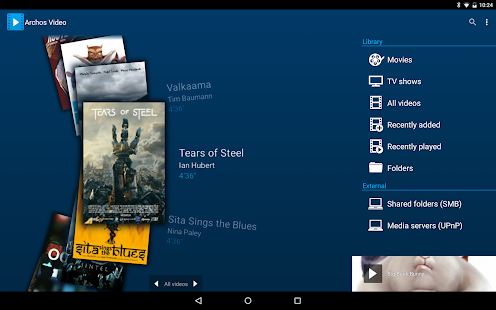
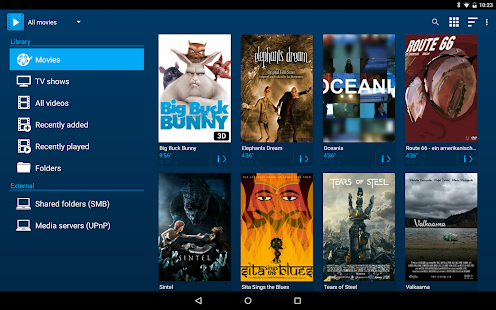
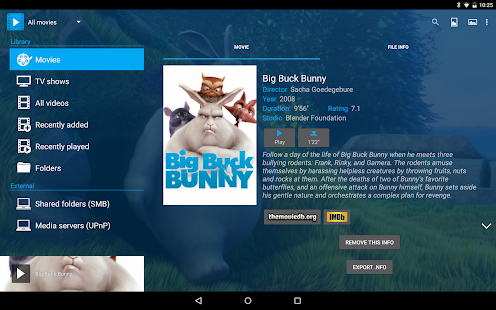
ARCHOS makes Video Player app available for all Android tablets and phones (requires Android 4.0 or later)!
The critically acclaimed Archos video player app offers an uncompromised multimedia experience.
- Hardware accelerated video decoding support for most devices and video formats;
- Ability to play content from any computer/network storage in your local network (SMB and UPnP) or from an external USB storage device;
- Automatic online retrieval of Movie and TV show information with poster and backdrop for both local and network content;
- Integrated subtitle downloader;
- Network indexing: import remote shared folders (SMB) in your multimedia library;
- Video browsing with either folder or library based navigation;
- Ubiquitous access to TV shows sorted in a series/season/episode hierarchical view;
- Multi-device network video resume;
- TV friendly: dedicated user interface that is keyboard/remote control compatible, AndroidTV compatibility ;
- Share and keep track of what you have watched using Trakt scrobbler (see http://trakt.tv/);
- 3D video: visual tagging and side by side/top bottom playback mode with Archos stereo virtual reality glasses or cardboard support;
- Audio: night mode and audio boost options;
- Android 5.0 Lollipop support with flat/material user interface design.
* Note that if you experience any issue with video hardware decoding you can force software decoding in Archos Video Player application settings to watch your video.
https://play.google.com/store/apps/details?id=com.archos.mediacenter.video
♫Nexus Media Importer v8.0.5♫

Nexus Media Importer ေလးပါ ဘာအတြက္ အသုံးၿပဳလည္းဆိုတာ ရွင္ၿပပါမယ္ မိမိဖုန္းနဲ usb flash နဲ ခ်ိန္ဆက္ၿပီး photo movie music စသည္ တိုကို ၾကည္နိင္ေအာင္ ၾကားခံ ေပတယ္ Nexus Media Importer ေလးပါ♫movie ၾကည္ ့မယ္ဆိုရင္ေတာ့ "BS Player", "MX Player" and "Dice Player" တိုကို ထည့္သြင္းမွာၾကည္ ့ရမယ္ေနာ္.. အေသးစိတ္ကိုေတာ့ ေအာက္မွာဖတ္ၾကည္ ့လိုက္ပါ♫Android4.0အထက္ကစျပီးအသံုးျပဳႏိုင္ပါတယ္။ဒါေပမဲ့ Play Store မွာထိုင္းဘတ္131.03နဲ႕ေရာင္းပါတယ္။ဒီမွာေတာ့အခမဲ့ေဒါင္းယူသြားႏိုင္ပါတယ္ဗ်ာ။
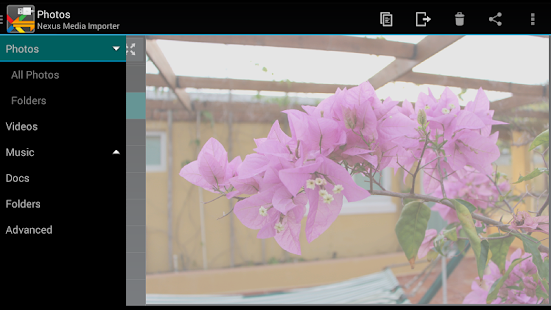
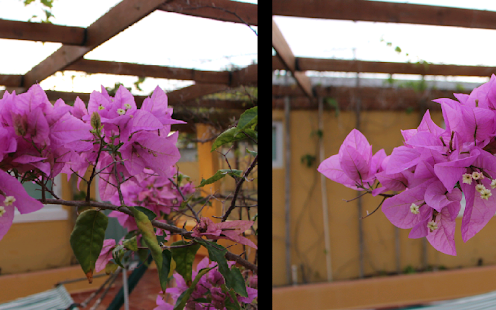
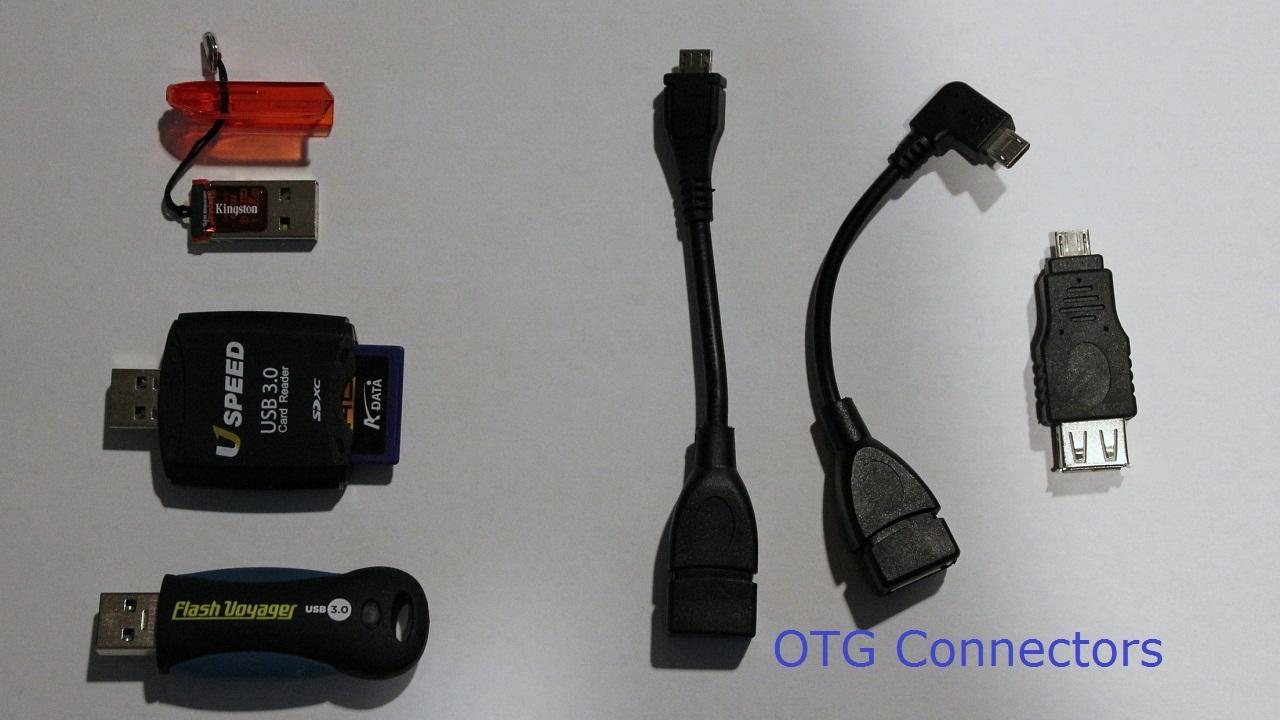

Nexus Media Importer allows you to stream and transfer music, video, photos and documents from a USB flash drive or card reader connected to your Nexus 5, Nexus 7 (G1 & G2), Nexus 10, Moto X, Galaxy Nexus, Xoom or other Android 4.0+ devices with USB Host support. See technical notes for a list of supported file types and file systems.
If you have the Nexus 7 2013 or Nexus 10, make sure you update to Android 4.4+ to avoid problems.
Requires the following hardware:
1. An Android 4.0+ device. Known compatible devices include the Google Nexus 5, Nexus 7 (G1 and G2), Nexus 10, Moto X, Galaxy Nexus and the Motorola Xoom. Please try the free "Nexus Photo Viewer" first if you do not have one of these devices. Due to hardware limitations, the Nexus 4 is not supported.
2. An USB OTG (On-The-Go) cable. Costs range from $1-10 USD, see screenshots for examples.
3. An USB Flash Drive or USB Card Reader with a flash memory card inserted, see screenshots for examples. Please see the FAQ on our website if you are trying to connect an external hard drive or other device.
IMPORTANT: To use NMI offline, you will have to activate the license by opening it online after installing.
To use:
-If you are using an card reader, put the flash memory card in the reader first.
-Attach your USB device to the OTG cable.
-Attach the OTG cable to the Nexus or other device.
-The application should launch automatically.
-Photos can be browsed by selecting from the list then swiping back and forth.
-Videos can be streamed with the Play icon.
-The Advanced tab can be used to manage and transfer files.
-Use the Connect screen to determine the viewed device and the destination device for the Copy/Move operations.
Support:
-If you have an issue, please visit the Developer's Website or contact us by clicking "Email Developer".
-Currently, most USB Mass Storage devices are supported. Due to the mind boggling number of USB devices available it is not 100% If you contact us, we may be able to support your device in a future release. If you have doubts, try the free "Nexus Photo Viewer" first.
Technical Notes:
-DOES NOT REQUIRE ROOT! Rooting may void your device's warranty.
-The USB drive/flash memory card must be formatted as FAT16, FAT32 or NTFS (no exFAT or extN support). FAT & NTFS are the most common formats for flash cards and USB Drives.
-Read Only for NTFS.
-Hard Drives. It is strongly recommended that you use external power when connecting a hard drive to a tablet. Please see the troubleshooting guide on my web site for more information. Do not connect an unpowered hard drive to a phone!
-This is a media streamer. Media types not natively supported by Android will require third party software. There are many excellent free and paid apps. in the Play market. For example: "BS Player", "MX Player" and "Dice Player"
-The internal music player only plays formats natively supported by Android. WMA files are not supported, but can be copied locally for use with another player.
How-to Videos:
-Connecting: http://www.youtube.com/watch?v=etrIpNHhWi0
-Photo: http://www.youtube.com/watch?v=3MSjqZWUIqI
-Music: http://www.youtube.com/watch?v=Es7QyhkWjcI
-General: http://www.youtube.com/watch?v=eCgvmvzqWAQ
See the FAQ on the Developer's Website for an overview of the permissions.
This software is not produced by Google, which owns the Nexus trademark.
https://play.google.com/store/apps/details?id=com.homeysoft.nexususb.importer
Nexus Media Importer v8.0.1 Nexus Media Importer ေလးပါ ဘာအတြက္ အသုံးၿပဳလည္းဆိုတာ ရွင္ၿပပါမယ္ မိမိဖုန္းနဲ usb flash နဲ ခ်ိန္ဆက္ၿပီး photo movie music စသည္ တိုကို ၾကည္နိင္ေအာင္ ၾကားခံ ေပတယ္ Nexus Media Importer ေလးပါ♫movie ၾကည္ ့မယ္ဆိုရင္ေတာ့ "BS Player", "MX Player" and "Dice Player" တိုကို ထည့္သြင္းမွာၾကည္ ့ရမယ္ေနာ္.. အေသးစိတ္ကိုေတာ့ ေအာက္မွာဖတ္ၾကည္ ့လိုက္ပါ♫Android4.0အထက္ကစျပီးအသံုးျပဳႏိုင္ပါတယ္။ဒါေပမဲ့ Play Store မွာထိုင္းဘတ္130.73နဲ႕ေရာင္းပါတယ္။ဒီမွာေတာ့အခမဲ့ေဒါင္းယူသြားႏိုင္ပါတယ္ဗ်ာ။
Make Money at : http://bit.ly/copy_win
Make Money at : http://bit.ly/copy_win
Nexus Media Importer v8.0.1 Nexus Media Importer ေလးပါ ဘာအတြက္ အသုံးၿပဳလည္းဆိုတာ ရွင္ၿပပါမယ္ မိမိဖုန္းနဲ usb flash နဲ ခ်ိန္ဆက္ၿပီး photo movie music စသည္ တိုကို ၾကည္နိင္ေအာင္ ၾကားခံ ေပတယ္ Nexus Media Importer ေလးပါ♫movie ၾကည္ ့မယ္ဆိုရင္ေတာ့ "BS Player", "MX Player" and "Dice Player" တိုကို ထည့္သြင္းမွာၾကည္ ့ရမယ္ေနာ္.. အေသးစိတ္ကိုေတာ့ ေအာက္မွာဖတ္ၾကည္ ့လိုက္ပါ♫Android4.0အထက္ကစျပီးအသံုးျပဳႏိုင္ပါတယ္။ဒါေပမဲ့ Play Store မွာထိုင္းဘတ္130.73နဲ႕ေရာင္းပါတယ္။ဒီမွာေတာ့အခမဲ့ေဒါင္းယူသြားႏိုင္ပါတယ္ဗ်ာ။
Make Money at : http://bit.ly/copy_win
Make Money at : http://bit.ly/copy_win
Nexus Media Importer v8.0.1 Nexus Media Importer ေလးပါ ဘာအတြက္ အသုံးၿပဳလည္းဆိုတာ ရွင္ၿပပါမယ္ မိမိဖုန္းနဲ usb flash နဲ ခ်ိန္ဆက္ၿပီး photo movie music စသည္ တိုကို ၾကည္နိင္ေအာင္ ၾကားခံ ေပတယ္ Nexus Media Importer ေလးပါ♫movie ၾကည္ ့မယ္ဆိုရင္ေတာ့ "BS Player", "MX Player" and "Dice Player" တိုကို ထည့္သြင္းမွာၾကည္ ့ရမယ္ေနာ္.. အေသးစိတ္ကိုေတာ့ ေအာက္မွာဖတ္ၾကည္ ့လိုက္ပါ♫Android4.0အထက္ကစျပီးအသံုးျပဳႏိုင္ပါတယ္။ဒါေပမဲ့ Play Store မွာထိုင္းဘတ္130.73နဲ႕ေရာင္းပါတယ္။ဒီမွာေတာ့အခမဲ့ေဒါင္းယူသြားႏိုင္ပါတယ္ဗ်ာ။
Make Money at : http://bit.ly/copy_win
Make Money at : http://bit.ly/copy_win
♫Equalizer Music Player v2.4.3♫
Equalizer Music Player v2.4.3 Apk ေလးကေတာ့ player ေလးထဲမွာ အေကာင္းဆံုး စားရင္းထဲမွာပါ၀င္ပါတယ္ သံုးၾကည့္လိုက္ပါ ♫Android 2.3မွာအသံုးျပဳႏိုင္ပါတယ္။ ဒါေပမဲ့ Play Store မွာထိုင္းဘတ္150.00နဲ႕ေရာင္းပါတယ္။ဒီမွာေတာ့အခမဲ့ေဒါင္းယူသြားႏိုင္ပါတယ္ဗ်ာ။
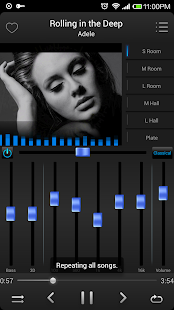
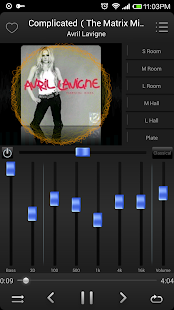
Equalizer Music Player is a professional Music Player. It will make your music sounds like you've never had before.
Intuitive music player, uses simple, useful and innovative controls. The most professional music player designed for music enthusiasts and students!
Using the professional audio decoding technology, it will play the music perfectly and realise high-fidelity playback. Besides, the most professional equalizer will help you adjust your own music exclusively.
Use with headphones for best results(stereo effect, surround effect, and so on). Put on the headphones,The world has nothing to do with you.
Key Features:
* Browse and play your music by artists,albums,songs,playlists
* Media volume and bass control
* Five band equalizer
* Bass boost effect
* Many equalizers preset
*Can turn off and turn on equalizer effect
* Music surround left and right
* Shuffle/repeat
* Share with your friends via facebook,e-mail,SMS,and so on
https://play.google.com/store/apps/details?id=com.nimblesoft.equalizerplayer&hl=en
♫Bass Booster Pro v2.3♫(October 3, 2014)
သီခ်င္းသံစဥ္ကို လိုသလိုစိတ္ၾကိဳက္ခ်ိန္းနိင္တယ္ Bass Booster Pro v2.3ေလးပါ October 3, 2014ထြက္ေလးပါ♫ Android2.3အထက္ကစျပီးအသံုးျပဳႏိုင္ပါတယ္။ဒါေပမဲ့ Play Store မွာထိုင္းဘတ္ 70.00နဲ႕ေရာင္းပါတယ္။ဒီမွာေတာ့အခမဲ့ေဒါင္းယူသြားႏိုင္ပါတယ္ဗ်ာ။
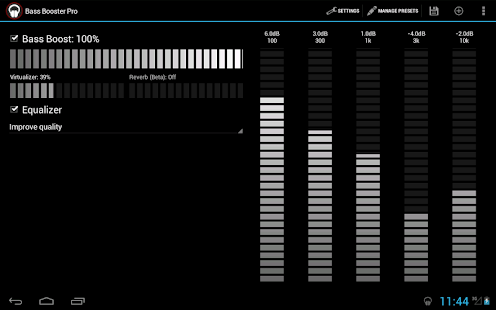
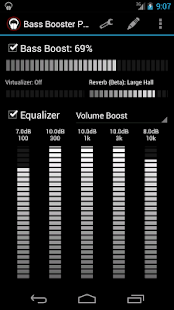
The Pro choices of Bass Booster embrace :
– Unlimited custom-made presets
– Homescreen widget (P×B)
– Homescreen shortcut (see underneath)
– Virtualizer
– Start on phone boot
– Preset auto-detection (see underneath)
– Automatic preset on incoming identify/SMS or all through phone conversations
– A themes
– Reverb (in Beta ! It doesn’t work on most telephones, so it could possibly be eradicated)
Please check out the free mannequin to see if it actually works ! It consists of :
- Bass Booster
- J Bands Equalizer (T on some telephones)
- 20 Presets (More Basses, Improve top quality, Electro, Techno, Dubstep, Dance, Pop, Rock, Metal, Reggae, Rap, C&R, Hip-Hop, Jazz, Latino, Acoustic, Classical, Party, Voice Boost, Volume Boost)
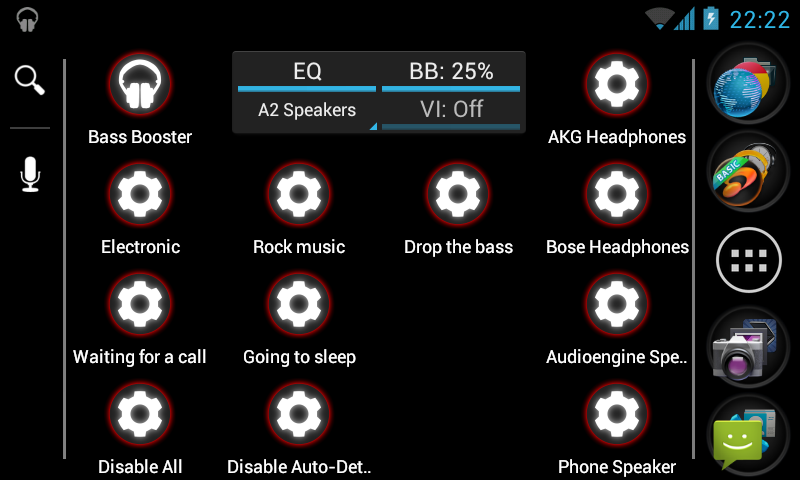
Homescreen Shortcut :
This perform permits you to create a B×M homescreen shortcut that’ll change Bass Booster settings in a single click on on with out even opening the app ! (see screenshots)
The *first* time you use a shortcut, some Android variations launch the app as correctly.
Preset auto-detection :
This perform permits presets to be routinely adjusted in accordance with the music that’s being carried out. Let’s say that you just’re listening to some Alternative Rock music, by default, Bass Booster will mechanically choose the Rock preset, nevertheless within the occasion you create a custom-made "Rock" preset, yours shall be chosen.
But it goes even further, you’d create an "Punk Rock" preset ("punkrock" works merely almost nearly as good) and a "Hard Rock" preset to get finer equalizer settings for each type.
This perform require to make use of an acceptable music participant and to have the audio file regionally saved and appropriately tagged.
Players that assist auto-detection :
– The stock music participant by Google
– Google Play Music
– JetAudio Player (actually useful)
– RealPlayer
– Player Pro
– Poweramp
– Rocket Music Player
– NRG Player
– Music Folder Player
– MortPlayer
– TTPod Music Mod
– Meridian
– ³ (Cubed)
– Astro Player
– Winamp (for Winamp, permit Scrobbling in Winamp settings and arrange the Last.FM app).
– DoubleTwist (permit Last.FM scrobbling in DoubleTwist settings)
This document is NOT full : others media players might match.
If your participant doesn’t work, merely drop us a mail and we’ll see if assist could possibly be added.
If auto-detection doesn’t work, try to permit Last.FM Scrobbling inside the settings of your media participant. (For Winamp and some others players, it’s a should to arrange the Last.FM app)
Permissions :
– Receive messages : This is required to set routinely set a preset if there’s an incoming SMS.
– Read phone state : This is required to mechanically set a preset if there’s an incoming identify.
– Start on boot : To set the audio outcomes merely after boot.
– Install shortcut : To create configuration shortcuts on you homescreen.
Disclamer :
We won’t be answerable for one thing which can happen to your phone, your audio gadget or your self ! Do not concentrate at full amount or with bass improve for too prolonged. This app can damage your models or listening to. Use it appropriately !
By downloading this software program, you accept that in no case we is perhaps held answerable for any type of damage ensuing of utilizing this app in any technique.
This software program program is obtainable by the copyright holders and contributors "as is" and any categorical or implied warranties, along with, nevertheless not restricted to, the implied warranties of merchantability and well being for a selected perform are disclaimed. In no event shall the copyright proprietor or contributors be liable for any direct, indirect, incidental, specific, exemplary, or consequential damages (along with, nevertheless not restricted to, procurement of substitute gadgets or suppliers; lack of use, information, or revenue; or enterprise interruption) however triggered and on any idea of obligation, whether or not or not in contract, strict obligation, or tort (along with negligence or in another case) arising in any means out of utilizing this software program program, even when steered of the potential of such damage.
What’s on this mannequin :
Quit selection inside the menu
Associate amount with presets
Fixed crash on phone boot
https://play.google.com/store/apps/details?id=com.desaxedstudios.bassboosterpro
– Unlimited custom-made presets
– Homescreen widget (P×B)
– Homescreen shortcut (see underneath)
– Virtualizer
– Start on phone boot
– Preset auto-detection (see underneath)
– Automatic preset on incoming identify/SMS or all through phone conversations
– A themes
– Reverb (in Beta ! It doesn’t work on most telephones, so it could possibly be eradicated)
Please check out the free mannequin to see if it actually works ! It consists of :
- Bass Booster
- J Bands Equalizer (T on some telephones)
- 20 Presets (More Basses, Improve top quality, Electro, Techno, Dubstep, Dance, Pop, Rock, Metal, Reggae, Rap, C&R, Hip-Hop, Jazz, Latino, Acoustic, Classical, Party, Voice Boost, Volume Boost)
Homescreen Shortcut :
This perform permits you to create a B×M homescreen shortcut that’ll change Bass Booster settings in a single click on on with out even opening the app ! (see screenshots)
The *first* time you use a shortcut, some Android variations launch the app as correctly.
Preset auto-detection :
This perform permits presets to be routinely adjusted in accordance with the music that’s being carried out. Let’s say that you just’re listening to some Alternative Rock music, by default, Bass Booster will mechanically choose the Rock preset, nevertheless within the occasion you create a custom-made "Rock" preset, yours shall be chosen.
But it goes even further, you’d create an "Punk Rock" preset ("punkrock" works merely almost nearly as good) and a "Hard Rock" preset to get finer equalizer settings for each type.
This perform require to make use of an acceptable music participant and to have the audio file regionally saved and appropriately tagged.
Players that assist auto-detection :
– The stock music participant by Google
– Google Play Music
– JetAudio Player (actually useful)
– RealPlayer
– Player Pro
– Poweramp
– Rocket Music Player
– NRG Player
– Music Folder Player
– MortPlayer
– TTPod Music Mod
– Meridian
– ³ (Cubed)
– Astro Player
– Winamp (for Winamp, permit Scrobbling in Winamp settings and arrange the Last.FM app).
– DoubleTwist (permit Last.FM scrobbling in DoubleTwist settings)
This document is NOT full : others media players might match.
If your participant doesn’t work, merely drop us a mail and we’ll see if assist could possibly be added.
If auto-detection doesn’t work, try to permit Last.FM Scrobbling inside the settings of your media participant. (For Winamp and some others players, it’s a should to arrange the Last.FM app)
Permissions :
– Receive messages : This is required to set routinely set a preset if there’s an incoming SMS.
– Read phone state : This is required to mechanically set a preset if there’s an incoming identify.
– Start on boot : To set the audio outcomes merely after boot.
– Install shortcut : To create configuration shortcuts on you homescreen.
Disclamer :
We won’t be answerable for one thing which can happen to your phone, your audio gadget or your self ! Do not concentrate at full amount or with bass improve for too prolonged. This app can damage your models or listening to. Use it appropriately !
By downloading this software program, you accept that in no case we is perhaps held answerable for any type of damage ensuing of utilizing this app in any technique.
This software program program is obtainable by the copyright holders and contributors "as is" and any categorical or implied warranties, along with, nevertheless not restricted to, the implied warranties of merchantability and well being for a selected perform are disclaimed. In no event shall the copyright proprietor or contributors be liable for any direct, indirect, incidental, specific, exemplary, or consequential damages (along with, nevertheless not restricted to, procurement of substitute gadgets or suppliers; lack of use, information, or revenue; or enterprise interruption) however triggered and on any idea of obligation, whether or not or not in contract, strict obligation, or tort (along with negligence or in another case) arising in any means out of utilizing this software program program, even when steered of the potential of such damage.
What’s on this mannequin :
Quit selection inside the menu
Associate amount with presets
Fixed crash on phone boot
https://play.google.com/store/apps/details?id=com.desaxedstudios.bassboosterpro
♫Bass Booster Pro v2.2.4♫
သီခ်င္းသံစဥ္ကို လိုသလိုစိတ္ၾကိဳက္ခ်ိန္းနိင္တယ္ Bass Booster Pro v2.2.4 ေလးပါ September 25, 2014 ထြက္ေလးပါ♫ Android2.3အထက္ကစျပီးအသံုးျပဳႏိုင္ပါတယ္။ဒါေပမဲ့ Play Store မွာထိုင္းဘတ္ 70.00နဲ႕ေရာင္းပါတယ္။ဒီမွာေတာ့အခမဲ့ေဒါင္းယူသြားႏိုင္ပါတယ္ဗ်ာ။
The Pro choices of Bass Booster embrace :
– Unlimited custom-made presets
– Homescreen widget (P×B)
– Homescreen shortcut (see underneath)
– Virtualizer
– Start on phone boot
– Preset auto-detection (see underneath)
– Automatic preset on incoming identify/SMS or all through phone conversations
– A themes
– Reverb (in Beta ! It doesn’t work on most telephones, so it could possibly be eradicated)
Please check out the free mannequin to see if it actually works ! It consists of :
- Bass Booster
- J Bands Equalizer (T on some telephones)
- 20 Presets (More Basses, Improve top quality, Electro, Techno, Dubstep, Dance, Pop, Rock, Metal, Reggae, Rap, C&R, Hip-Hop, Jazz, Latino, Acoustic, Classical, Party, Voice Boost, Volume Boost)
Homescreen Shortcut :
This perform permits you to create a B×M homescreen shortcut that’ll change Bass Booster settings in a single click on on with out even opening the app ! (see screenshots)
The *first* time you use a shortcut, some Android variations launch the app as correctly.
Preset auto-detection :
This perform permits presets to be routinely adjusted in accordance with the music that’s being carried out. Let’s say that you just’re listening to some Alternative Rock music, by default, Bass Booster will mechanically choose the Rock preset, nevertheless within the occasion you create a custom-made "Rock" preset, yours shall be chosen.
But it goes even further, you’d create an "Punk Rock" preset ("punkrock" works merely almost nearly as good) and a "Hard Rock" preset to get finer equalizer settings for each type.
This perform require to make use of an acceptable music participant and to have the audio file regionally saved and appropriately tagged.
Players that assist auto-detection :
– The stock music participant by Google
– Google Play Music
– JetAudio Player (actually useful)
– RealPlayer
– Player Pro
– Poweramp
– Rocket Music Player
– NRG Player
– Music Folder Player
– MortPlayer
– TTPod Music Mod
– Meridian
– ³ (Cubed)
– Astro Player
– Winamp (for Winamp, permit Scrobbling in Winamp settings and arrange the Last.FM app).
– DoubleTwist (permit Last.FM scrobbling in DoubleTwist settings)
This document is NOT full : others media players might match.
If your participant doesn’t work, merely drop us a mail and we’ll see if assist could possibly be added.
If auto-detection doesn’t work, try to permit Last.FM Scrobbling inside the settings of your media participant. (For Winamp and some others players, it’s a should to arrange the Last.FM app)
Permissions :
– Receive messages : This is required to set routinely set a preset if there’s an incoming SMS.
– Read phone state : This is required to mechanically set a preset if there’s an incoming identify.
– Start on boot : To set the audio outcomes merely after boot.
– Install shortcut : To create configuration shortcuts on you homescreen.
Disclamer :
We won’t be answerable for one thing which can happen to your phone, your audio gadget or your self ! Do not concentrate at full amount or with bass improve for too prolonged. This app can damage your models or listening to. Use it appropriately !
By downloading this software program, you accept that in no case we is perhaps held answerable for any type of damage ensuing of utilizing this app in any technique.
This software program program is obtainable by the copyright holders and contributors "as is" and any categorical or implied warranties, along with, nevertheless not restricted to, the implied warranties of merchantability and well being for a selected perform are disclaimed. In no event shall the copyright proprietor or contributors be liable for any direct, indirect, incidental, specific, exemplary, or consequential damages (along with, nevertheless not restricted to, procurement of substitute gadgets or suppliers; lack of use, information, or revenue; or enterprise interruption) however triggered and on any idea of obligation, whether or not or not in contract, strict obligation, or tort (along with negligence or in another case) arising in any means out of utilizing this software program program, even when steered of the potential of such damage.
What’s on this mannequin : (Updated : Sep 25, 2014)
Quit selection inside the menu
Associate amount with presets
Fixed crash on phone boot
https://play.google.com/store/apps/details?id=com.desaxedstudios.bassboosterpro

– Unlimited custom-made presets
– Homescreen widget (P×B)
– Homescreen shortcut (see underneath)
– Virtualizer
– Start on phone boot
– Preset auto-detection (see underneath)
– Automatic preset on incoming identify/SMS or all through phone conversations
– A themes
– Reverb (in Beta ! It doesn’t work on most telephones, so it could possibly be eradicated)
Please check out the free mannequin to see if it actually works ! It consists of :
- Bass Booster
- J Bands Equalizer (T on some telephones)
- 20 Presets (More Basses, Improve top quality, Electro, Techno, Dubstep, Dance, Pop, Rock, Metal, Reggae, Rap, C&R, Hip-Hop, Jazz, Latino, Acoustic, Classical, Party, Voice Boost, Volume Boost)
Homescreen Shortcut :
This perform permits you to create a B×M homescreen shortcut that’ll change Bass Booster settings in a single click on on with out even opening the app ! (see screenshots)
The *first* time you use a shortcut, some Android variations launch the app as correctly.
Preset auto-detection :
This perform permits presets to be routinely adjusted in accordance with the music that’s being carried out. Let’s say that you just’re listening to some Alternative Rock music, by default, Bass Booster will mechanically choose the Rock preset, nevertheless within the occasion you create a custom-made "Rock" preset, yours shall be chosen.
But it goes even further, you’d create an "Punk Rock" preset ("punkrock" works merely almost nearly as good) and a "Hard Rock" preset to get finer equalizer settings for each type.
This perform require to make use of an acceptable music participant and to have the audio file regionally saved and appropriately tagged.
Players that assist auto-detection :
– The stock music participant by Google
– Google Play Music
– JetAudio Player (actually useful)
– RealPlayer
– Player Pro
– Poweramp
– Rocket Music Player
– NRG Player
– Music Folder Player
– MortPlayer
– TTPod Music Mod
– Meridian
– ³ (Cubed)
– Astro Player
– Winamp (for Winamp, permit Scrobbling in Winamp settings and arrange the Last.FM app).
– DoubleTwist (permit Last.FM scrobbling in DoubleTwist settings)
This document is NOT full : others media players might match.
If your participant doesn’t work, merely drop us a mail and we’ll see if assist could possibly be added.
If auto-detection doesn’t work, try to permit Last.FM Scrobbling inside the settings of your media participant. (For Winamp and some others players, it’s a should to arrange the Last.FM app)
Permissions :
– Receive messages : This is required to set routinely set a preset if there’s an incoming SMS.
– Read phone state : This is required to mechanically set a preset if there’s an incoming identify.
– Start on boot : To set the audio outcomes merely after boot.
– Install shortcut : To create configuration shortcuts on you homescreen.
Disclamer :
We won’t be answerable for one thing which can happen to your phone, your audio gadget or your self ! Do not concentrate at full amount or with bass improve for too prolonged. This app can damage your models or listening to. Use it appropriately !
By downloading this software program, you accept that in no case we is perhaps held answerable for any type of damage ensuing of utilizing this app in any technique.
This software program program is obtainable by the copyright holders and contributors "as is" and any categorical or implied warranties, along with, nevertheless not restricted to, the implied warranties of merchantability and well being for a selected perform are disclaimed. In no event shall the copyright proprietor or contributors be liable for any direct, indirect, incidental, specific, exemplary, or consequential damages (along with, nevertheless not restricted to, procurement of substitute gadgets or suppliers; lack of use, information, or revenue; or enterprise interruption) however triggered and on any idea of obligation, whether or not or not in contract, strict obligation, or tort (along with negligence or in another case) arising in any means out of utilizing this software program program, even when steered of the potential of such damage.
What’s on this mannequin : (Updated : Sep 25, 2014)
Quit selection inside the menu
Associate amount with presets
Fixed crash on phone boot
https://play.google.com/store/apps/details?id=com.desaxedstudios.bassboosterpro
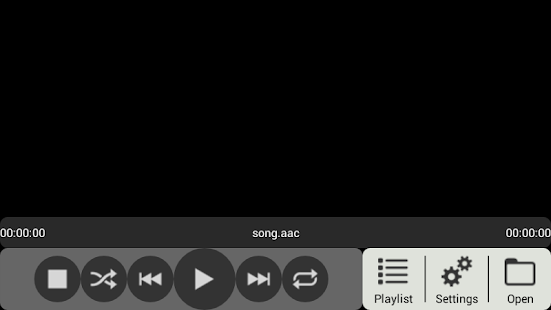
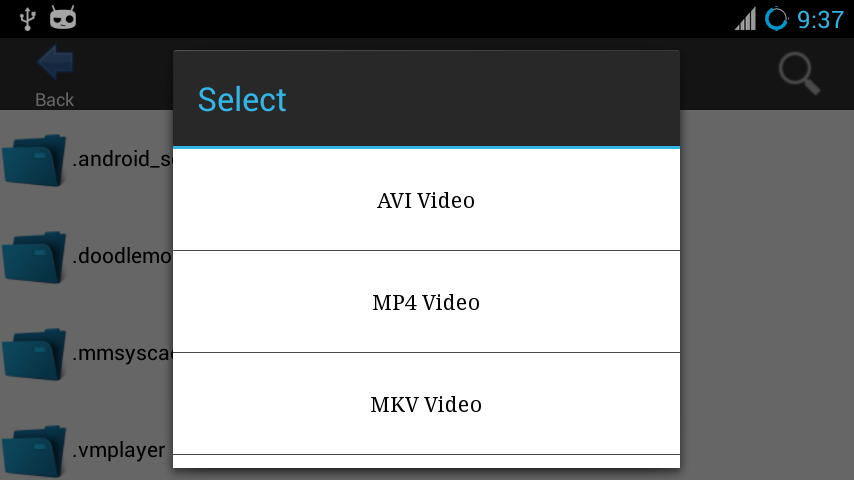
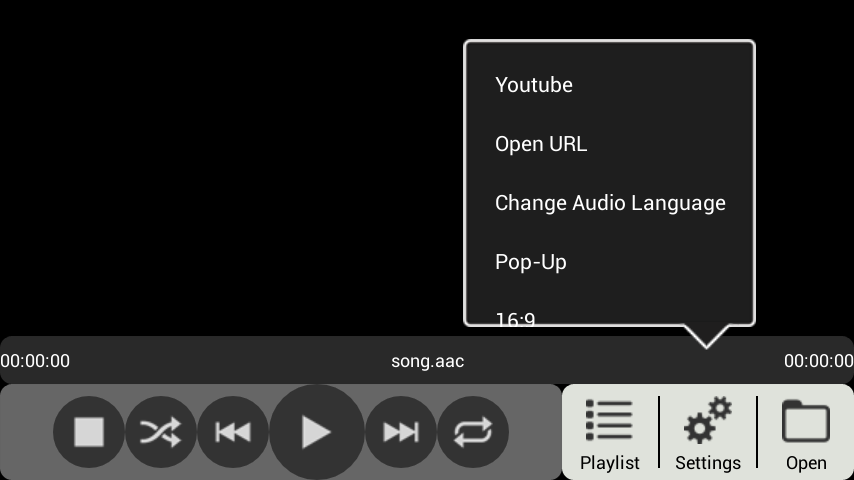
♫Avplayer For Android v2 apk♫

ဖုန္းအတြက္ player ေလးအသစ္ေတြ႔လို႔တင္ေပးလုိက္တယ္ September 23, 2014 ထြက္ေနာ္ဖုန္းplayer အလန္းေလးထည့္ထားခ်င္တယ္ေနာက္ျပီးေတာ့player ဒီဇိုင္းေလးလန္းလန္းေလးလိုခ်င္တယ္ဆိုသူေတြအတြက္ Avplayer တဲ့ေနာ္ ၿပီးေတာ AVI, MKV , FLV , RMVB , MP3 , OGG , FLAC , WEBM and many other formats.
Websites : Youtube , Dailymotion , Vimeo , BBC and many other websites. ေပါင္းမ်ားတြင္ ့လည္ းအဆင္ေၿပပါတယ္♫
...Android4.0ႏွင့္အထက္ကစျပီးအသံုးျပဳႏိုင္ပါတယ္။ဒါေပမဲ့ Play Store မွာထိုင္းဘတ္ 64.59နဲ႕ေရာင္းပါတယ္။ဒီမွာေတာ့အခမဲ့ေဒါင္းယူသြားႏိုင္ပါတယ္ဗ်ာ။
https://play.google.com/store/apps/details?id=com.vnd.mplayer.neon.noad&hl
♫ZPlayer v4.06 build 222 Patched apk♫

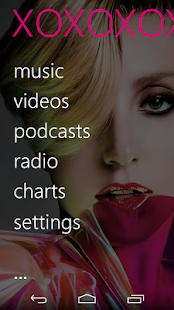
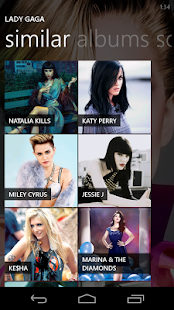
ဖုန္းအတြက္ player ေလးအသစ္ေတြ႔လို႔တင္ေပးလုိက္တယ္ေနာ္ဖုန္းplayer အလန္းေလးထည့္ထားခ်င္တယ္ေနာက္ျပီးေတာ့player ဒီဇိုင္းေလးလန္းလန္းေလးလိုခ်င္တယ္ဆိုသူေတြအတြက္ ZPlayer တဲ့ေနာ္ ...Android4.0ႏွင့္အထက္ကစျပီးအသံုးျပဳႏိုင္ပါတယ္။ဒါေပမဲ့ Play Store မွာထိုင္းဘတ္ 69.19နဲ႕ေရာင္းပါတယ္။ဒီမွာေတာ့အခမဲ့ေဒါင္းယူသြားႏိုင္ပါတယ္ဗ်ာ။
Try out new ZPlayer features by joining the Beta testers.
Zplayer is designed around the easy and content driven “metro” style. Although looking minimal, it packs a huge punch!
ZPlayer offers:
• Music Features
- Media Player
- Listening history
- Auto generated playlists (Most Played, Favorite songs, Recently Added)
- Metadata (Album reviews, artist biographies, similar artists, similar albums)
- Music weekly trends (artist top tracks, top songs, top albums)
- Artist events*, song lyrics*.
• SongKick Events
• Last.fm Features:
- Last.fm scrobbling.
- Last.fm ‘now playing’ status updates.
- Last.fm ‘likes’ submissions.
- Last.fm messaging (ShoutBox) to other users.
- Last.fm scrobbling history.
• Podcast Features
- Video podcast streaming, subscriptions, downloads, player.
- Audio podcast streaming, subscriptions, downloads, player.
- Podcast search and recommendations.
• Online Radio
- Shoutcast Radio streaming (with DNAS metadata).
- Radio station search.
- Dar.fm radio listings and search
• Multilanguage Support
- ZPlayer supports English, Dutch, French, Spanish, Finnish, Italian, Russian, Turkish, Polish, Hebrew, and Portuguese languages
• ID3 Tag editor
- Single track ID3 editor
- Album editor (artist name, album year)
- Album Art Editor (API Search, Art generator, Pick from Gallery, Use camera to capture Image)
• Video player
- Fullscreen video player
- Sectioned catergories (Music videos, Movies)
- Editable ‘music videos’, and ‘movies’ directories
• Browse the albums sections not in your library and even get the album prices, 30 seconds audio samples of tracks, and “Buy” links to the albums.
• Audio Effects
- Audio Equalizer
- Create, save and manage equalizer profiles
- Bass boost
- Virtualizer
- Automatic EQ (based on track genre) **
- Audio Balance
• ZPlayer now fully supports ICS, Status Bar+, and features 5 beautiful widgets, which give different functionality.
• Cool features, including artist background images and panoramas, changeable background images.
• Swiping the application homescreen to the left/right shows the 'current playing' song and listening history, and “xtras”
+To jump to the 'now playing' screen, use the volume controls to reveal the music controls, and then tap on the track or artist name.
++ if you use a third party equalizer that controls the output mix for all media playing on the device, disable it before using this application. This application needs to control its own audio effects.
** For device sporting Android 2.3+
https://play.google.com/store/apps/details?id=app.odesanmi.and.wpmusic
ZPlayer v4.05 build 217 apk
ဖုန္းအတြက္ player ေလးအသစ္ေတြ႔လို႔တင္ေပးလုိက္တယ္ေနာ္ဖုန္းplayer အလန္းေလးထည့္ထားခ်င္တယ္ေနာက္ျပီးေတာ့player ဒီဇိုင္းေလးလန္းလန္းေလးလိုခ်င္တယ္ဆိုသူေတြအတြက္ ZPlayer တဲ့ေနာ္ ...Android 4.0မွာအသံုးျပဳႏိုင္ပါတယ္။ဒါေပမဲ့ Play Store မွာထိုင္းဘတ္65.15နဲ႕ေရာင္းပါတယ္။ဒီမွာေတာ့အခမဲ့ေဒါင္းယူသြားႏိုင္ပါတယ္ဗ်ာ။
Try out new ZPlayer features by joining the Beta testers.Zplayer is designed around the easy and content driven “metro” style. Although looking minimal, it packs a huge punch!
ZPlayer offers:
• Music Features
- Media Player
- Listening history
- Auto generated playlists (Most Played, Favorite songs, Recently Added)
- Metadata (Album reviews, artist biographies, similar artists, similar albums)
- Music weekly trends (artist top tracks, top songs, top albums)
- Artist events*, song lyrics*.
• SongKick Events
• Last.fm Features:
- Last.fm scrobbling.
- Last.fm ‘now playing’ status updates.
- Last.fm ‘likes’ submissions.
- Last.fm messaging (ShoutBox) to other users.
- Last.fm scrobbling history.
• Podcast Features
- Video podcast streaming, subscriptions, downloads, player.
- Audio podcast streaming, subscriptions, downloads, player.
- Podcast search and recommendations.
• Online Radio
- Shoutcast Radio streaming (with DNAS metadata).
- Radio station search.
- Dar.fm radio listings and search
• Multilanguage Support
- ZPlayer supports English, Dutch, French, Spanish, Finnish, Italian, Russian, Turkish, Polish, Hebrew, and Portuguese languages
• ID3 Tag editor
- Single track ID3 editor
- Album editor (artist name, album year)
- Album Art Editor (API Search, Art generator, Pick from Gallery, Use camera to capture Image)
• Video player
- Fullscreen video player
- Sectioned catergories (Music videos, Movies)
- Editable ‘music videos’, and ‘movies’ directories
• Browse the albums sections not in your library and even get the album prices, 30 seconds audio samples of tracks, and “Buy” links to the albums.
• Audio Effects
- Audio Equalizer
- Create, save and manage equalizer profiles
- Bass boost
- Virtualizer
- Automatic EQ (based on track genre) **
- Audio Balance
• ZPlayer now fully supports ICS, Status Bar+, and features 5 beautiful widgets, which give different functionality.
• Cool features, including artist background images and panoramas, changeable background images.
• Swiping the application homescreen to the left/right shows the 'current playing' song and listening history, and “xtras”
+To jump to the 'now playing' screen, use the volume controls to reveal the music controls, and then tap on the track or artist name.
++ if you use a third party equalizer that controls the output mix for all media playing on the device, disable it before using this application. This application needs to control its own audio effects.
** For device sporting Android 2.3+
https://play.google.com/store/apps/details?id=app.odesanmi.and.wpmusic
Subscribe to:
Posts
(
Atom
)