


Showing posts with label Firefox ဆိုင္ရာ. Show all posts
www.google.com.mm ကို ၿမန္မာဘာသာၿဖစ္သုံးနိင္ၿပီး

မသိေသးသူမ်ားအတြက္ www.google.com.mm မွာ ျမန္မာစာကို မွန္ကန္စြာ ျမင္ရရန္နွင့္ Myanmar Unicode Kayboard ပံုကိုေဖၚ၍ ၾကည့္ျပီးရိုက္ၾကရေအာင္....
အရင္ဆံုး Mozilla Firefox ကို ဖြင့္လိုက္ပါ။အေပၚေထာင့္က Menu ျဖစ္တဲ့ Firefox ကို နိွပ္ျပီးဝင္လိုက္ပါ
Add-ons ဆိုတ့ဲအထဲကို ဝင္ပါ။
အေပၚေထာင့္က Search ထဲမွာ tagu plugin လို႔ ေရးျပီးရွာလိုက္ပါ။
( တန္ခူး ) ဆိုျပီးေဆာ့ဝဲထြက္လာပါမယ္ install လုပ္ေပးလိုက္ပါ သင့္Browser တြင္ Unicode ေဖာင့္ကို မွန္စြာျမင္ရသြားပါျပီ ( မၿမင္ရပါက ပိတ္ၿပီးၿပန္ဖြင့္လိုက္ပါ ok သြားပါမယ္ )
Myanmar Unicode Kayboard ကိုေဖၚ၍ ၾကည့္ျပီးအရိုက္ေလ့က်င့္ရေအာင္
www.google.com.mm သို႔ဝင္ေရာက္ျပီးတဲ့အခါမွာ ( Google.com.mm offered in: ျမန္မာဘာသာ ) ဆိုတဲ့ စာေလးကိုနွိပ္လိုက္ပါ ။
Search အကြက္၏ ညာဘက္ေထာင့္မွာ ကီးဘုတ္ပံုေလးေတြ႔ပါမယ္ နွိပ္ေပးလိုက္ပါ။
သင့္ရဲ့ကြန္ျပဴတာ မွန္သားျပင္စခရင္ေပၚမွာ ပံုထဲကအတိုင္း Unicode Kayboard ရိုက္နည္း ပံုေလးထြက္လာပါျပီ Myanmar Unicode လက္ကြက္ၾကည့္၍ သင္ အရိုက္ေလ့က်င့္လို႔ရပါျပီ။
မလုပ္တတ္ဘူးဆိုပါက လုပ္နည္းဗြီဒီယိုကို ဒီမွာႏွိပ္၍ ၾကည့္ၿပီးလုပ္နိူင္ပါတယ္
https://www.youtube.com/watch?v=qXUXwmbdnP8
Google Chrome သမားမ်ားအတြက္ Myanmar Unicode ကို မွန္စြာၿမင္ရေအာင္လုပ္နည္းေလးပါ
Google Chrome ရဲ႕ Menu ထဲၿဖစ္တဲ့အထဲကိုဝင္လိုက္
Settings ထဲဝင္လိုက္ပါ။
Extensions ထဲဝင္လိုက္ပါ။
အရင္ဆံုး Mozilla Firefox ကို ဖြင့္လိုက္ပါ။အေပၚေထာင့္က Menu ျဖစ္တဲ့ Firefox ကို နိွပ္ျပီးဝင္လိုက္ပါ
Add-ons ဆိုတ့ဲအထဲကို ဝင္ပါ။
အေပၚေထာင့္က Search ထဲမွာ tagu plugin လို႔ ေရးျပီးရွာလိုက္ပါ။
( တန္ခူး ) ဆိုျပီးေဆာ့ဝဲထြက္လာပါမယ္ install လုပ္ေပးလိုက္ပါ သင့္Browser တြင္ Unicode ေဖာင့္ကို မွန္စြာျမင္ရသြားပါျပီ ( မၿမင္ရပါက ပိတ္ၿပီးၿပန္ဖြင့္လိုက္ပါ ok သြားပါမယ္ )
Myanmar Unicode Kayboard ကိုေဖၚ၍ ၾကည့္ျပီးအရိုက္ေလ့က်င့္ရေအာင္
www.google.com.mm
Search အကြက္၏ ညာဘက္ေထာင့္မွာ ကီးဘုတ္ပံုေလးေတြ႔ပါမယ္ နွိပ္ေပးလိုက္ပါ။
သင့္ရဲ့ကြန္ျပဴတာ မွန္သားျပင္စခရင္ေပၚမွာ ပံုထဲကအတိုင္း Unicode Kayboard ရိုက္နည္း ပံုေလးထြက္လာပါျပီ Myanmar Unicode လက္ကြက္ၾကည့္၍ သင္ အရိုက္ေလ့က်င့္လို႔ရပါျပီ။
မလုပ္တတ္ဘူးဆိုပါက လုပ္နည္းဗြီဒီယိုကို ဒီမွာႏွိပ္၍ ၾကည့္ၿပီးလုပ္နိူင္ပါတယ္
https://www.youtube.com/watch?v=qXUXwmbdnP8
Google Chrome သမားမ်ားအတြက္ Myanmar Unicode ကို မွန္စြာၿမင္ရေအာင္လုပ္နည္းေလးပါ
Google Chrome ရဲ႕ Menu ထဲၿဖစ္တဲ့အထဲကိုဝင္လိုက္
Settings ထဲဝင္လိုက္ပါ။
Extensions ထဲဝင္လိုက္ပါ။
အဲဒီထဲဝင္လိုက္တာနဲ႕ get more extensions ဆိုတာကိုေတြ႔ပါမယ္ ႏွိပ္လိုက္ပါ။
chrome web store ထဲေရာက္သြားပါၿပီ tagu plugin လို႔ ေရးျပီးရွာလိုက္ပါ။
( တန္ခူး ) ဆိုျပီးေဆာ့ဝဲထြက္လာပါမယ္ install လုပ္ေပးလိုက္ပါ။
သင့္Browser တြင္ Unicode ေဖာင့္ကို မွန္စြာျမင္ရသြားပါျပီ ။
( မၿမင္ရပါက ပိတ္ၿပီးၿပန္ဖြင့္လိုက္ပါ ok သြားပါမယ္ )
အားလံုးပဲ အဆင္ေၿပၾကပါေစ.....။
မွတ္ခ်က္ ။ ။ Unicode ေဆာ့ဝဲသြင္းထားၿပီးၿပီဆိုရင္ ယူနီကုဒ္မသံုးထားပဲ ရိုးရိုးေရးထားတဲ့ဆိုက္ေတြက မမွန္ေတာ့ပါဘူး။ယူနီကုဒ္အသံုးၿပဳၿပီး ေရးထားတဲ့စာေတြပဲ မွန္ေတာ့မွာပါ ။ အရင္လိုၿပန္မွန္ခ်င္တယ္ဆိုရင္ ယူနီကုဒ္ေဆာ့ဝဲကို ၿပန္ဖ်က္စရာမလိုပါဘူး ။
က်ေနာ္လုပ္နည္းေရးထားတဲ့အတိုင္းၿပန္ဝင္လိုက္ပါ ၿပီးရင္ Extensions ထဲဝင္လိုက္ပါ ။
ကိုယ္အင္စေတာလုပ္ထားတဲ့ ေကာင္ေတြေတြ႔ပါမယ္။
အဲဒီမွာ ( တန္ခူး ) ေဆာ့ဝဲက Disable ဆိုတာကို ႏွိပ္ၿပီးပိတ္လိုက္ပါ Enable ဆိုၿပီးေၿပာင္းသြားပါမယ္ ။
အဲဒီမွာ ( တန္ခူး ) ေဆာ့ဝဲက Disable ဆိုတာကို ႏွိပ္ၿပီးပိတ္လိုက္ပါ Enable ဆိုၿပီးေၿပာင္းသြားပါမယ္ ။
အဲလိုလုပ္ၿပီးၿပီဆိုရင္ ကိုယ္ၾကည့္ေနတဲ့ဆိုက္က မမွန္ဘူးဆိုတဲ့လင့္ကို Reflash လုပ္ေပးလိုက္ပါ ၿပန္မွန္သြားပါၿပီ ။ ဒါမွမဟုတ္လဲ Browser ကို ပိတ္ၿပီး ၿပန္ဖြင့္လိုက္ပါ အရင္လိုမွန္သြားပါၿပီ ယူနီကုဒ္နဲ႕ေရးထားတဲ့ဆိုက္က စာေတြမွန္ေအာင္ၿပန္ဖတ္ခ်င္တယ္ဆိုရင္ေတာ့ ၿပန္သြားၿပီး Enable ဆိုတာကို နွိပ္ေပးလိုက္ေပါ့ေနာ္
အားလံုးပဲ အဆင္ေၿပပါေစ...
Firefox 31.0 Beta 4 Full Version

အသစ္ထြက္ရွိလာတယ္Firefox 31.0 Beta 4 ေလးပါ...........
Mozilla Firefox is a fast, light and tidy open source web browser. At its public launch in 2004 Mozilla Firefox was the first browser to challenge Microsoft Internet Explorer’s dominance. Since then, Mozilla Firefox has consistently featured in the top 3 most popular browsers globally and this is set to continue thanks to the release of Firefox 30. The key features that have made Mozilla Firefox so popular are the simple and effective UI, browser speed and strong security capabilities. The browser is particularly popular with developers thanks to its open source development and active community of advanced users.
Easier Browsing
Mozilla put of a lot of resources into creating a simple but effective UI aimed at making browsing quicker and easier. They created the tab structure that has been adopted by most other browsers. In recent years Mozilla has also focused on maximizing browsing area by simplifying toolbar controls to just a Firefox button (which contains settings and options) and back/forward buttons. The URL box features direct Google searching as well as an auto predict/history feature called Awesome Bar. On the right side of the URL box there are bookmarking, history and refresh buttons. To the right of the URL box is a search box which allows you to customize your search engine options. Outside of that a view button controls what you see below the URL. Next to that you have the download history and home buttons.

Youtube ၾကည္႔တုန္း ခဏတုိင္း ရပ္ေနလွ်င္
တစ္ခါတစ္ေလ အပ်င္းေျပ Youtube မွာ Mr bean တုိ႔ Tom & Jerry တုိ႔ ၾကည္႔တုိ႔ ခဏခဏ ရပ္ေနရင္ ဖီးပ်က္တတ္တယ္ မလား ။ တစ္ခါတစ္ေလ သီခ်င္းနားေထာင္ျပန္ေတာ႔လည္း ခဏခဏရပ္ေနေတာ႔ ဇိမ္ပ်က္လွပါတယ္ ။ ဒါေၾကာင္႔ အဲဒါေလးေတြ မၾကံဳရေအာင္ မရပ္ေလေအာင္ ကြ်န္ေတာ္ေတြ႔ထားတဲ႔ နည္းေတြကို ျပန္ရွဲေပးပါမယ္ .....
(နဂုိကတည္းက လုိင္းမေကာင္းရင္ေတာ႔ ကြ်န္ေတာ္လည္း မလုပ္တတ္ပါ း)))))

ပထမဆုံး firefox Option က Advanced >>> Network >>>> Override automatic cache ကို select ေပးျပီးေတာ႔ Clear now ကို နိပ္ပါ ။
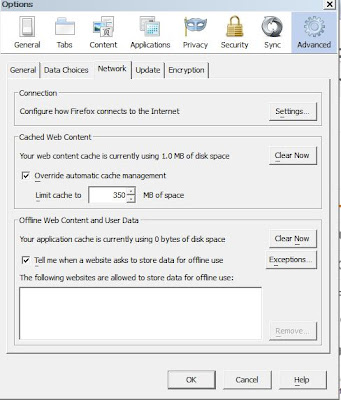 ျပီးရင္ေတာ႔ Tools-> Options-> Privacy က remove individual cookies နိပ္လုိက္ပါ ။ ျပီးရင္ေတာ႔ အေပၚနားမွာ youtube လုိ႔ ရုိက္ထည္႔ျပီးေတာ႔ တက္လာတဲ႔ဟာေတြကို အကုန္ဖ်က္ခ်လုိက္ပါ ။

 ကဲ ခုဆုိရင္ေတာ႔ လုိင္းေကာင္းေနလ်က္သားနဲ႔ ခဏခဏရပ္ေနတဲ႔ ျပႆနာေတာ႔ ရွင္းေလာက္ျပီ ထင္တယ္ ။ နဂုိကတည္း လုိင္းမေကာင္းရင္ေတာ႔ ကြ်န္ေတာ္လည္း မလုပ္တတ္ပါ :) အဆင္ေျပပါေစဗ်ာ ။
(နဂုိကတည္းက လုိင္းမေကာင္းရင္ေတာ႔ ကြ်န္ေတာ္လည္း မလုပ္တတ္ပါ း)))))
ပထမဆုံး firefox Option က Advanced >>> Network >>>> Override automatic cache ကို select ေပးျပီးေတာ႔ Clear now ကို နိပ္ပါ ။


Firefox ရဲ႕ ေနာက္ခံ ပု့ေၿပာင္းနည္း


အရုပ္ေလးေတြထည့္လို႕ရပါတယ္..အဲဒီလိုထည့္ဖို႕အတြက္ ကိုယ္စိတ္ၾကိဳက္လုပ္လို႕ရသလို.
သီးျခား Website တစ္ခုကေနလဲ ျပဳလုပ္လို႕ရပါတယ္..အဲဒီ၀က္ဆိုက္လခ့္ကေတာ့
http://www.getpersonas.com/en-US/gallery/All/?sort=movers ျဖစ္ပါတယ္.။
ကဲ..၀င္ၿပီးကလိၾကည့္ေပေတာ့.ထူးျခားမႈကေတာ့.ျမင္ရလိမ့္မယ္ခင္ဗ်ာ။လုပ္မတတ္ရင္ အေပၚမွာပံုနဲရွင္းၿပထာတယ္ေနာ္
၀င္ၾကည့္ရမယ့္ Website က http://www.getpersonas.com/en-US/gallery/All/?sort=movers ျဖစ္ပါတယ္။
Subscribe to:
Posts
(
Atom
)